Back To Blog
Zigbee vs Wi-Fi vs Matter: Which Is Better for Smart Home Devices?
Zigbee suits low-power sensors and lighting networks; Wi-Fi suits devices that need more bandwidth or a straightforward connection to your existing network.
Matter addresses a different problem: making compatible smart home devices work across platforms, using Wi-Fi, Thread, or Ethernet underneath.
This comparison separates connectivity from compatibility so you can choose the right combination rather than chase one universal winner.
Which is better for your smart home devices?
Choose Zigbee when you want a low-power mesh network managed through a compatible hub. Choose Wi-Fi when your devices need higher-bandwidth connectivity, especially for video or audio.
Prioritize Matter when cross-platform control matters, then check whether each Matter device uses Wi-Fi or Thread—the distinction determines its networking requirements.
The practical recommendation is to choose by device role, not standard alone. A camera, a battery-powered contact sensor, and a smart plug have different requirements; forcing them onto one technology adds an unnecessary constraint.
Think of the following as a buying framework, not a performance ranking.
|
Decision criterion |
Zigbee |
Wi-Fi |
Matter |
|---|---|---|---|
|
Main purpose |
Low-power device networking and control |
Wireless IP network connectivity |
Shared application standard for compatible devices |
|
Strongest fit |
Sensors, switches, lighting |
Video, audio, powered devices |
Cross-brand, cross-platform control |
|
Network structure |
Dedicated mesh |
Devices connect through access points |
Uses Wi-Fi, Thread, or Ethernet |
|
Supporting hardware |
Compatible coordinator or hub |
Wi-Fi access point; platform requirements vary |
Controller; Thread border router for Thread devices |
|
Battery suitability |
Designed for low-power operation |
Depends on device design and workload |
Depends on underlying transport |
|
Compatibility check |
Device and hub support |
Device and platform integration |
Device type, features, and platform support |
These distinctions reflect the standards’ different roles. Matter is not a competing radio technology, so a product can be both Wi-Fi-enabled and Matter-compatible.
Smart home protocols explained: networking versus compatibility
Comparisons of home automation protocols become confusing when they treat every label as interchangeable. Zigbee combines networking with a language for device functions. Wi-Fi supplies network connectivity, while Matter defines how supported devices communicate their capabilities and receive commands over an IP network.
Thread completes the picture. It is a low-power IP mesh network that can carry Matter traffic, making it relevant to battery-powered devices. Matter over Wi-Fi and Matter over Thread share an application standard, but they do not share the same wireless network.
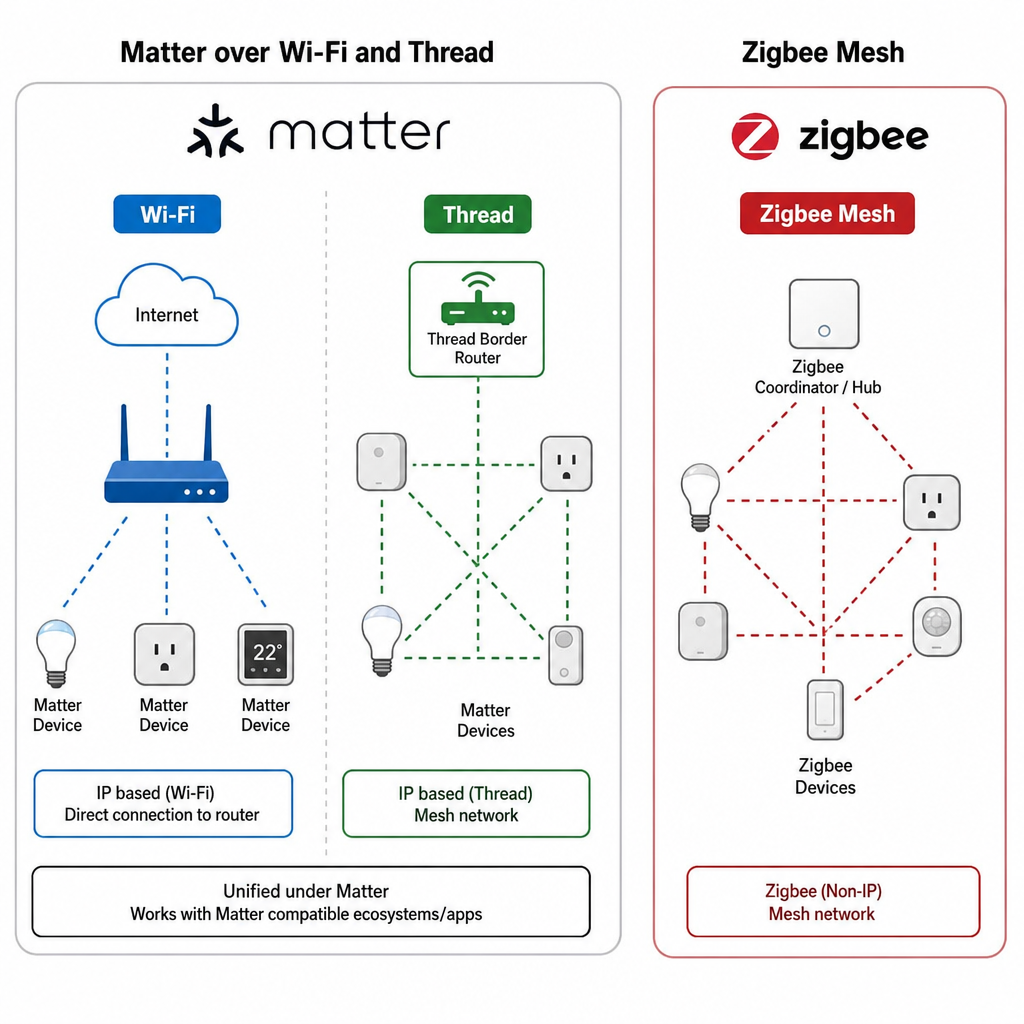
Read product labels as two separate answers: how does it connect, and how can you control it? “Matter-compatible” answers the second question without fully answering the first. That is why a Matter logo alone is not enough to decide whether you already own the hardware needed for installation.
Setup, hubs, and supporting hardware
Start with an inventory of what you own. Record the exact model of your router, smart speaker, display, and automation hub, then compare their documented capabilities with the new device’s requirements. Do not budget for another box until you have checked whether an existing device supplies the required function.
|
Setup requirement |
Zigbee |
Wi-Fi |
Matter |
|---|---|---|---|
|
Initial connection |
Join a compatible coordinator’s network |
Join the home Wi-Fi network |
Commission into a compatible Matter platform |
|
Dedicated device network |
Yes |
Usually uses existing Wi-Fi |
Only when using Thread rather than Wi-Fi/Ethernet |
|
Extra functionality to verify |
Hub support for the specific product |
App and platform requirements |
Controller support and, for Thread, border routing |
|
Main buying mistake |
Assuming every hub exposes every feature |
Assuming Wi-Fi guarantees platform compatibility |
Assuming every Matter controller includes Thread |
Zigbee networks use a coordinator, with routers and end devices performing different roles. Matter setup depends on the chosen ecosystem and transport; Google Home, for example, requires a compatible hub and a Thread border router for Thread devices. Check the actual platform instructions rather than treating “hub-free” as a complete setup description.
A Thread border router and a Matter controller are different functions, even when one product provides both. The border router connects Thread to the broader IP network; it does not translate Thread into a proprietary device language. This distinction helps prevent buying a second controller when the missing component is actually border routing.
Which option is better for battery life and coverage?
Zigbee and Matter over Thread are the stronger starting points for small battery-powered sensors because their networks support low-power operation. Wi-Fi is better aligned with higher-bandwidth workloads. Matter itself does not determine battery life or coverage: the underlying network and individual product design do.
|
Practical concern |
Zigbee |
Wi-Fi |
Matter |
|---|---|---|---|
|
Small battery sensors |
Low-power design is a core strength |
Assess the specific product carefully |
Thread is the low-power networking option |
|
Extending coverage |
Compatible routing devices relay traffic |
Improve access-point coverage |
Thread mesh or Wi-Fi coverage, depending on transport |
|
Battery devices repeating traffic |
End devices do not route |
Not a normal expectation |
Thread battery end devices do not route |
|
Video and audio workloads |
Not the intended networking role |
Better suited to high bandwidth |
Requires a suitable transport and supported implementation |
Zigbee routers remain available to relay traffic, while sleepy end devices conserve power by shutting down their radios when idle. In Thread networks, battery-powered end devices similarly rely on parent devices rather than extending coverage themselves. Adding sensors therefore does not automatically strengthen either mesh.
Plan coverage around reliable routing infrastructure, not just device count. For a distant sensor, check the path back through compatible mesh routers; for a Wi-Fi device, check access-point coverage where it will actually operate. Avoid buying by advertised range alone—your purchase decision should include a return or testing plan for the intended locati0n.
Which offers better integration and local control?
Matter is the clearest choice when your priority is standardized integration across supported platforms. Zigbee can provide local device communication through a compatible system, while Wi-Fi devices may use local control, cloud services, or both. The important distinction is where commands and automations run, not simply which radio carries them.
|
Integration criterion |
Zigbee |
Wi-Fi |
Matter |
|---|---|---|---|
|
Shared device language |
Zigbee defines device behavior |
Wi-Fi alone does not define it |
Matter standardizes supported functions |
|
Cross-platform access |
Depends on hub integrations |
Depends on product integrations |
Multi-admin supports multiple compatible platforms |
|
Local command path |
Depends on the controlling system |
Depends on the implementation |
Designed for local connectivity |
|
Internet-outage expectations |
Verify hub and automation behavior |
Verify local versus cloud dependencies |
Local functions can remain available; cloud functions differ |
|
Existing-device integration |
Use supported hub connections |
Use supported platform integrations |
Compatible bridges can expose other protocols |
Matter’s multi-admin capability lets a supported device participate in more than one compatible platform. That helps households using different control apps, but it does not mean every platform offers identical controls. Google explicitly notes that not all Matter device types are fully supported in its ecosystem.
For smart device integration, check the feature you need rather than just the compatibility badge. Confirm that the target platform exposes the relevant controls, measurements, and automation triggers. If one function is essential to your routine, make support for that function a purchase requirement.
Local control also needs a careful definition. Matter commands can travel within the home network without a manufacturer-cloud round trip, but remote access still needs an internet-connected controller. An internet outage is different from a power failure: keep the network and controller requirements separate when planning resilience.
Cost and maintenance: compare the whole setup
There is no defensible blanket winner on price without comparing actual products and existing hardware. Instead, price the completed setup: devices, any missing hub or controller, coverage improvements, and optional services you intend to use. Run that calculation for your first room and your planned expansion, not just the cheapest individual sensor.
|
Cost or maintenance item |
Zigbee |
Wi-Fi |
Matter |
|---|---|---|---|
|
Hardware to include |
Devices and compatible coordinator/hub |
Devices and adequate Wi-Fi infrastructure |
Devices, controller, and border router where required |
|
Expansion check |
Hub support and mesh layout |
Coverage and platform integration |
Transport requirements and platform feature support |
|
Troubleshooting starting point |
Joining, parent/router paths, hub support |
Network connection and service dependencies |
Commissioning, IP connectivity, controller support |
|
Replacement decision |
Preserve working compatible equipment |
Preserve working supported integrations |
Add compatibility where it solves a real need |
These are planning categories, not claims that one setup costs less. Zigbee’s coordinator and routing roles, Thread’s border-router requirements, and Matter platform support create different equipment checklists. Your existing hardware can change the result substantially.
For maintenance, ask practical questions before purchase: where are updates managed, how is a failed device replaced, and which settings need to be recorded? Save setup codes and document the model numbers used in important automations. A clear inventory makes future comparisons more useful than choosing solely by protocol name.
Keep working devices and expand deliberately
You do not need to replace a working Zigbee installation simply to adopt Matter. A compatible Matter bridge can expose supported Zigbee devices to a Matter ecosystem. Bridging adds an integration path; it does not change the devices’ underlying wireless protocol.
Use this checklist before adding or migrating devices:
Define the job. List the required action, measurement, trigger, and control method before choosing a connection standard.
Check exact compatibility. Match the device model and required functions to your hub or platform documentation.
Identify missing infrastructure. Distinguish a Zigbee coordinator, Matter controller, and Thread border router rather than treating them as interchangeable.
Test a complete routine. Try the intended trigger and action in their final locations before expanding the purchase.
Validate outage behavior. Check which controls remain usable without internet access, keeping power and local networking available.
The hardware and compatibility checks matter because bridging, border routing, and application control solve different problems. A successful connection is only the first milestone; the useful outcome is the routine you intended to build.
The best choice is a coordinated mix
Our recommendation is to use Zigbee where a compatible low-power mesh already serves your needs, Wi-Fi where bandwidth is important, and Matter where standardized cross-platform control improves the experience. For new battery-powered Matter devices, examine Thread requirements; for powered Matter products, check whether they use Wi-Fi or Thread. These are complementary choices, not mutually exclusive camps.
Before your next purchase, write down your preferred platform, existing hardware, installation locati0n, and essential features. Then compare products against that list. The best smart home automation protocols are the ones that support your actual routines without unnecessary replacements or missing components.
Frequently Asked Questions Smart Home Protocols
What is the main difference between Zigbee, Wi-Fi, and Matter?
Zigbee is primarily designed for low-power device networking and control, Wi-Fi connects devices to an IP network, and Matter serves as a compatibility standard that allows devices to work across different platforms.
Can I use Zigbee devices with Matter?
Yes, Zigbee devices can be integrated into a Matter ecosystem through a compatible Matter bridge that exposes these devices for cross-platform use.
Which protocol is better for battery-powered devices?
Zigbee and Matter over Thread are generally better suited for battery-powered devices due to their low-power operation capabilities.
Do I need a hub for Wi-Fi devices?
Typically, Wi-Fi devices connect directly to the home Wi-Fi network and do not require a hub, but it's important to verify compatibility and platform support for specific devices.
How do I choose the right protocol for my smart home setup?
Consider your specific needs, such as device type, power requirements, and desired compatibility; Zigbee is ideal for low-power devices, Wi-Fi is best for bandwidth-intensive applications, and Matter offers cross-platform compatibility.